
Configuration
Every PostGrid Settings field, how the webhook is registered and reset, who can do what, and everything the app adds to a site.
On this page
The app has one settings page, PostGrid Settings. It is linked from the Integrations workspace, under Direct Mail, and only the System Manager role can read or change it. This page describes each field, the webhook the settings register, and then lists everything the app adds to your site.
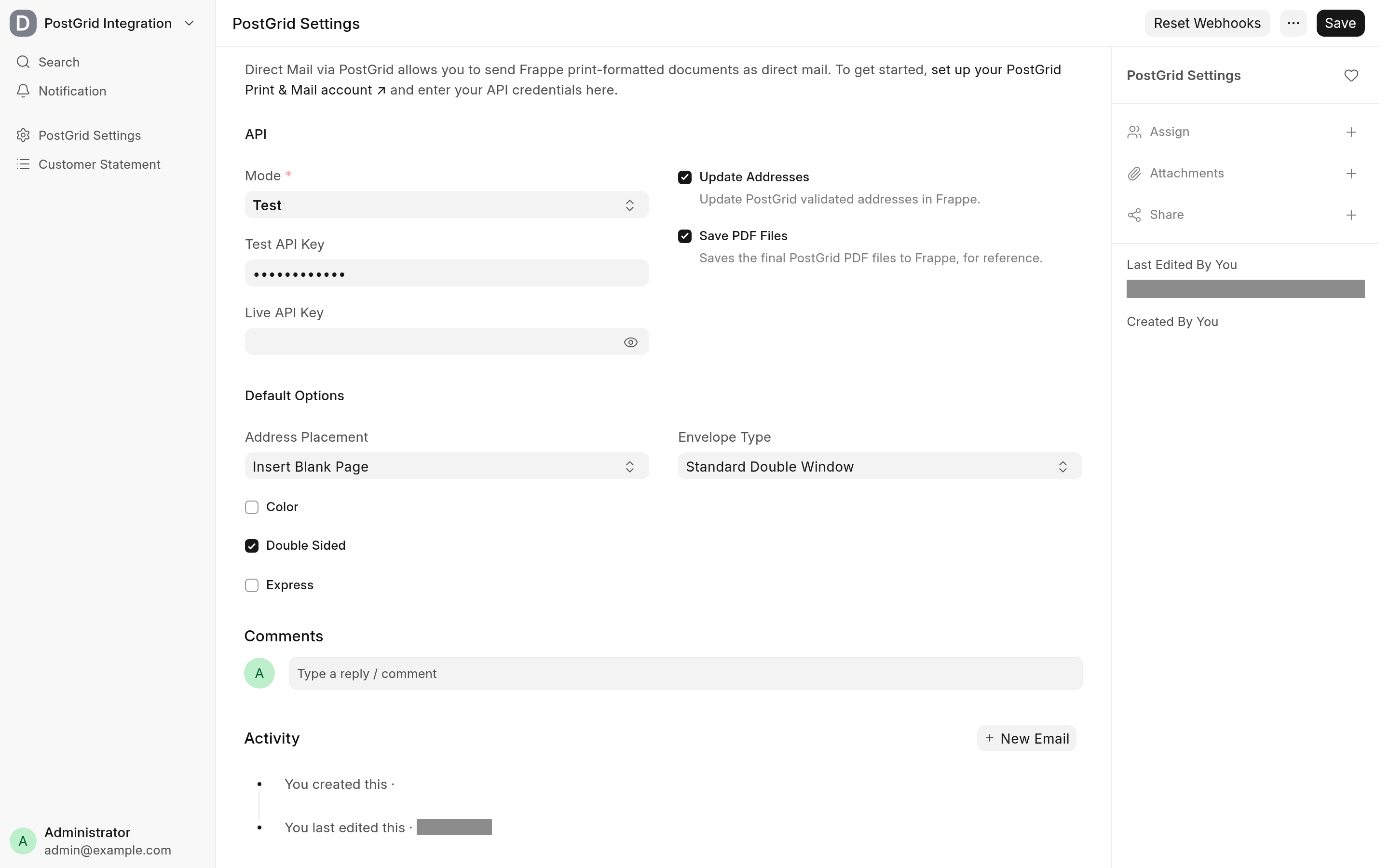
Set up PostGrid Settings
Set up a PostGrid Print & Mail account and copy its API keys.
Open PostGrid Settings.
Enter the Test API Key and the Live API Key, and choose the Mode that is in use.
Set the default options under Default Options. The Mail dialog starts from them.
Choose whether to Save PDF Files and Update Addresses.
Save. The first save in each mode registers a webhook with PostGrid for that mode.
Saving needs the API key of the selected Mode. The first save in a mode also registers the webhook with that key, so it fails if PostGrid refuses the key. Letters sent with a test key are not printed or posted by PostGrid.
Settings
API
| Field | What it does | Default |
|---|---|---|
| Mode | Test or Live. Letters, and the webhook a save registers, use this mode's API key. Required. | Test |
| Test API Key | The PostGrid Print & Mail API key for test mode. Stored encrypted. | Empty |
| Live API Key | The PostGrid Print & Mail API key for live mode. Stored encrypted. While it is empty the form shows a short help text with a link to sign up for PostGrid. | Empty |
| Update Addresses | When PostGrid reports a verified address for a letter, the matching Frappe Address is overwritten with PostGrid's version. See Track mailed letters. | Off |
| Save PDF Files | Keeps a copy of the PDF PostGrid made for each letter, attached to the letter's Communication. See Track mailed letters. | Off |
Default Options
These are the starting values of the Mail dialog on the print view. A Mailed Letter notification does not use them: it has its own copy of each option.
| Field | What it does | Default |
|---|---|---|
| Address Placement | Insert Blank Page puts the address on an extra first page; Top of First Page prints it at the top of the document's first page. | Insert Blank Page |
| Color | Prints in colour. | Off |
| Double Sided | Prints on both sides of the paper. | Off |
| Express | Sends the letter by PostGrid's express mail. | Off |
| Envelope Type | Standard Double Window or Flat. | Standard Double Window |
Address Placement and Envelope Type have no default of their own, so Frappe starts them at their first option, as it does for any Select field without one.
Hidden fields
The form also stores three values you do not edit: the webhook secret, generated on the first save, and the id of the webhook registered for each mode.
The webhook
PostGrid reports each status change of a letter to a webhook. Saving PostGrid Settings registers one for the current Mode when that mode has none yet, at this address:
https://<YOUR_SITE>/api/method/postgrid_direct_mail.postgrid_integration.doctype.postgrid_settings.webhooksThe address is built by Frappe's get_url, so it uses host_name from the site's site_config.json when that is set, and otherwise the address you opened the site with. PostGrid must be able to reach it over the internet. Each call is signed with the webhook secret, and the app refuses one whose signature does not match.
Reset Webhooks
Use Reset Webhooks in the form's actions to replace the webhooks, for example after the site's address changes. For each mode that has an API key it deletes the webhook it recorded, registers a new one and records its id. Then it shows which modes it reset, skipped or could not reset, with PostGrid's reason for each failure.
A mode without an API key is skipped. Nothing is deleted or created on that account and its webhook id stays as it is. With neither key entered it changes nothing and asks for one.
Each mode is reset on its own. A failure in one mode is reported, logged in the Error Log, and never stops or undoes the other.
A recorded id always matches PostGrid. If the old webhook could not be deleted it is kept. If it was deleted but PostGrid could not register a new one, the id is cleared, and the next save in that mode, or the next Reset Webhooks, registers one.
Reset Webhooks needs write permission on PostGrid Settings.
Roles and permissions
| Who | Can |
|---|---|
| System Manager | Open and change PostGrid Settings, use Reset Webhooks, and create Mailed Letter notifications (Frappe gives only this role access to Notification). |
| Any desk user who can print a document | Mail it from the print view. Printing needs read or print permission on the document, as everywhere in Frappe; the app adds no role of its own. |
| PostGrid | Call the webhook without a login. The call must be signed with the webhook secret. |
The app reads the sender and recipient Address and Contact, and records the Integration Request and the Communication, without checking the mailing user's permissions on them.
What the app adds to your site
This is the complete list, so you can see what installing and migrating change.
DocTypes
| DocType | Kind | Purpose |
|---|---|---|
| PostGrid Settings | Single | API keys, mode, default options, webhook secret and webhook ids. One action, Reset Webhooks. |
Custom fields
| DocType | Field | Type | Notes |
|---|---|---|---|
| Address | Postgrid ID (postgrid_id) | Read Only | Hidden. PostGrid's id for the address, set when a letter is mailed from or to it. |
| Notification | Direct Mail Settings | Section Break | After Print Format. Shown for the Mailed Letter channel. |
| Notification | From Address (from_address) | Link (Address) | The sender. |
| Notification | To Address Field | Select | The document's Address field to mail to. Mandatory for the Mailed Letter channel. |
| Notification | Address Placement | Select | Insert Blank Page or Top of First Page. |
| Notification | Color, Double Sided, Express | Check | The mailing options. |
| Notification | To Contact Field | Select | The document's Contact field, for the attention line. |
| Notification | Envelope Type | Select | Standard Double Window or Flat. Mandatory for the Mailed Letter channel. |
| Notification | With Cover Letter | Check | Mails a cover letter in front of the document. |
| Notification | Cover Letter Print Format | Link | Shown, and mandatory, when With Cover Letter is ticked. |
Property Setters
| DocType | Field | Change |
|---|---|---|
| Notification | Channel | Options: Mailed Letter added. |
| Communication | Communication Type | Options: Mailed Letter added. |
| Notification | Recipients | Mandatory only for the Email, SMS and System Notification channels, and not when Send To All Assignees is ticked. |
Behaviour
| Where | Change |
|---|---|
| Notification | The Notification class is extended (extend_doctype_class) so that a notification on the Mailed Letter channel mails the document. Other channels are left to Frappe. |
| Notification form | A form script (doctype_js) hides the message and recipient sections for the Mailed Letter channel, turns on and hides Attach Print, and fills the To Address Field and To Contact Field choices. |
| Print view | A page script (page_js for print) adds the Mail button and the Mail Letter dialog. |
| Timeline | Every document's timeline shows its mailed letters (additional_timeline_content). |
| Integrations workspace | A Direct Mail card linking PostGrid Settings. |
The app adds no scheduled job: Mailed Letter notifications run in Frappe's own notification run, including its daily job for the Days Before and Days After events.
Endpoints
| Method | Who | Does |
|---|---|---|
postgrid_direct_mail.postgrid_integration.doctype.postgrid_settings.mail_letter | Logged-in users | Mails a document. Used by the Mail dialog. |
postgrid_direct_mail.postgrid_integration.doctype.postgrid_settings.get_postgrid_defaults | Logged-in users | Returns the default options for the Mail dialog. |
postgrid_direct_mail.postgrid_integration.doctype.postgrid_settings.webhooks | Guest, signed by PostGrid | Receives PostGrid's status updates. |
postgrid_direct_mail.postgrid_integration.doctype.postgrid_settings.postgrid_settings.reset_webhooks | Write on PostGrid Settings, POST only | The Reset Webhooks action. |