
Threat protection
Threat protection
Suricata inspects the traffic the router forwards, alerts on known threats, and can drop them. How it's wired in and what it can't see.
On this page
The router can run Suricata, an open-source intrusion detection and prevention engine, inline on the traffic it forwards. Suricata compares each packet against downloaded rule sets, including Emerging Threats Open (ET Open), and records what matches as events on the Threat Protection page in Cockpit. It's off by default. Use it when you want to see, and optionally block, known malware, exploit and scanning traffic that crosses the router.
IDS and IPS mode
Suricata runs in one of two modes, set on Threat Protection → Settings:
IDS mode (the default): Suricata raises alerts, and the router converts no rules to drop. Traffic flows as before, and you see what matched.
IPS mode: the router applies the drop actions you set per category or per signature on the Policies tab, and Suricata drops packets that match those rules.
Both modes load the same rules and alert on the same traffic. The mode only decides whether your drop actions are applied. A rule you write yourself with the drop action drops in either mode; see Extra local rules.
How a packet reaches Suricata
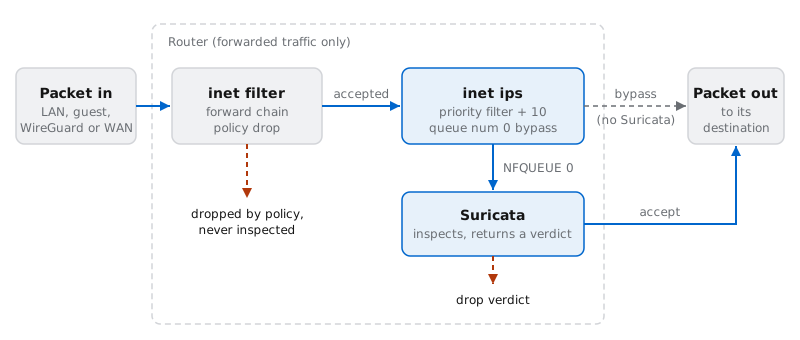
A packet the router forwards enters the nftables forward hook. That covers LAN to internet, internet to a port-forwarded host, WireGuard to LAN, and guest to internet.
The main firewall chain (
inet filter, policy drop) decides first. Anything it drops never reaches Suricata, so guest isolation and the rest of the firewall policy work the same with the IPS on or off.Packets the firewall accepts reach a second chain, in the
inet ipstable at priorityfilter + 10. Its only rule,queue num 0 bypass, hands every packet to netfilter queue 0.Suricata, attached to queue 0 in NFQ mode, inspects the packet and returns a verdict: accept, or drop when a drop rule matches.
The design fails open. The bypass flag tells the kernel to accept packets when nothing is attached to queue 0: while Suricata starts, restarts or has crashed. Suricata's queue is also set to fail-open, so if it falls behind and the queue fills, the kernel passes the extra packets uninspected. Your network stays up, but those packets aren't inspected.
What counts as your network
Most rules are written in terms of $HOME_NET, the networks you protect, and $EXTERNAL_NET, everything else. The router builds $HOME_NET for you from:
the LAN subnet, for example
192.168.1.0/24the guest subnet, when the guest network is on
each WireGuard interface's address, for example
10.100.0.1/24, and every peer's allowed IPs
$EXTERNAL_NET is everything not in $HOME_NET. Neither is a setting; they follow your network and WireGuard configuration.
The LAN and guest entries are IPv4 only. The IPv6 prefix your ISP delegates isn't part of $HOME_NET, so your hosts' IPv6 addresses count as external. Forwarded IPv6 traffic is still queued and inspected, but rules keyed on $HOME_NET don't match it, including inbound IPv6 port forwards.
What it doesn't do
It doesn't inspect traffic to or from the router itself. Only the forward hook is queued. That leaves out Cockpit, SSH, DNS queries to the router's resolver, connections that end at the reverse proxy, and connections the Cloudflare Tunnel connector makes to your hosts.
It doesn't inspect traffic between devices on the same network. The bridge switches it without routing it.
It doesn't decrypt TLS. Suricata sees handshake details such as the server name (SNI), not the content.
It doesn't block anything in IDS mode, apart from
droprules you write yourself.It doesn't protect while Suricata is down or overloaded. Traffic passes uninspected; see above.
It doesn't match
$HOME_NETrules on IPv6.It doesn't replace DNS filtering. The built-in DNS-over-HTTPS rules only alert. Blocking DoH providers is the resolver's job; see DNS enforcement.
It doesn't send notifications. You review events in Cockpit or in the journal.
In this section
Turn it on: enable Suricata in IDS mode, what it costs, and how rules are updated.
Tune the rules: triage events, then disable, suppress or drop signatures, and add your own rules.
Events and logs: the Overview and Statistics tabs, logs on disk, commands and troubleshooting.