
Ingress
Choose an ingress
Compare port forwards, the reverse proxy and Cloudflare Tunnel for reaching LAN services from the internet, and pick the right one.
On this page
A service on your LAN, such as a NAS web interface, a wiki or a game server, can't be reached from the internet until the router lets traffic in. The router offers three ways to do that: port forwards, a reverse proxy, and Cloudflare Tunnel. This page compares them and helps you pick one.
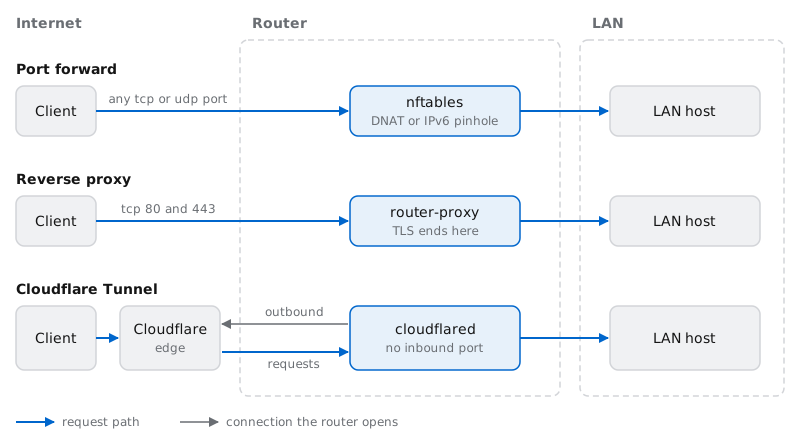
The three options
Port forward: opens one or more WAN ports to a single host. Over IPv4 the router rewrites the destination to the host's static IP (DNAT). Over IPv6 it opens a pinhole to the host's own address. Any tcp or udp service works.
Reverse proxy: the router itself answers on the WAN's tcp ports 80 and 443. It gets a Let's Encrypt certificate for each route, ends TLS, and passes each request to the host that its hostname belongs to. Many web apps can share one public IPv4 address.
Cloudflare Tunnel: the router keeps outbound connections open to Cloudflare. Requests for your names arrive at Cloudflare and come back down those connections. No WAN port opens.
Compare them
| Port forward | Reverse proxy | Cloudflare Tunnel | |
|---|---|---|---|
| Routes by | port | hostname (TLS SNI and the Host header) | hostname |
| Inbound WAN ports | the forwarded ports | tcp 80 and 443 | none |
| Works behind CGNAT | not over IPv4 | not over IPv4 | yes |
| TLS certificate | the host's own | the router's, from Let's Encrypt | Cloudflare's, at its edge |
| Where TLS ends | on the host | on the router | at Cloudflare |
| Traffic passes through | the router's firewall, unchanged | the router, decrypted | Cloudflare, decrypted, then the router |
| Non-HTTP protocols | yes, any tcp or udp port | no, HTTP and HTTPS only | no, HTTP and HTTPS only |
| Needs a Cloudflare account | no | only for dynamic DNS or DNS-01 certificates | yes, with your domain's zone on it |
| Inspected by threat protection | yes, when it's on | no | no |
CGNAT (carrier-grade NAT) only takes away inbound IPv4: the router has no public IPv4 address, so nothing on the internet can open an IPv4 connection to it. If your ISP also gives you IPv6, clients that connect over IPv6 can still reach a port forward or the reverse proxy.
Threat protection (Suricata) inspects traffic the router forwards between networks. Proxied and tunneled requests end at a program on the router, which then opens its own connection to the host, so neither leg is forwarded traffic. See Threat protection.
Which one to use
Use a port forward when:
the service isn't HTTP, such as a game server, SIP, SSH or a VPN server on a LAN host;
the host must present its own certificate, or you want TLS to run end to end to the host;
a single web app only needs to be reachable on its own port, such as 5001, with the certificate it already has.
Use the reverse proxy when:
you publish one or more web apps and want them all on port 443 with trusted certificates, told apart by name;
the router has a public IPv4 address, or your clients connect over IPv6;
the app speaks plain HTTP on the LAN and you want HTTPS in front of it without touching the app.
Use Cloudflare Tunnel when:
the router is behind CGNAT, or you don't want any inbound port open;
your domain's DNS is hosted on Cloudflare;
you accept that Cloudflare decrypts the traffic at its edge.
You can combine them. For example, publish web apps through the reverse proxy and a game server through a port forward. The only rules are the name conflicts below, and that an IPv4 port forward of tcp 80 or 443 can't coexist with the reverse proxy.
The Ingress page
All three are managed in Cockpit on the Ingress page, which has three tabs:
| Tab | What it holds | Guide |
|---|---|---|
| Port forwards | Static port forwards to registered hosts. | Port forwards |
| Reverse proxy | The proxy switch, Publish hostnames, the Certificates card for Let's Encrypt, and the routes with their certificate status. | Reverse proxy |
| Tunnel | The tunnel switch, its API token, the tunnel hostnames, and the Tunnel status card. | Cloudflare Tunnel |
The tabs share one Save button, pinned below them, whose menu offers Save and apply. Save writes the settings file; Save and apply also applies it. The Reverse proxy and Tunnel tabs check the whole configuration as you edit. When something would fail the build, they list it under Fix these before applying, and Save and apply stays disabled until you fix it.
Port forwards used to live on the Firewall page, which now links here. UPnP and NAT-PMP stay on Firewall → UPnP; see UPnP and NAT-PMP.
Before you start: register the host
Every ingress sends traffic to a registered host by name, never to a raw address. Register the device on the Hosts page and give it a Static IP (a DHCP reservation). IPv6 port forwards also need the host's IPv6 suffix. See Hosts and host groups.
Add port forward, Add route and Add hostname stay disabled until at least one host is registered.
Port forwards, proxy routes and tunnel hostnames follow their host:
Renaming a host on the Hosts page updates every entry that names it.
Removing a host removes those entries too. The confirm button says how many, for example Confirm remove (and its 1 port forward(s), 1 proxy route(s)).
Hostname conflicts
Four features publish a public DNS name, and each one writes that name's record in its own way:
dynamic DNS Router names point at the router;
a host's Public hostname points at that host;
reverse proxy route hostnames, with Publish hostnames on, point at the router;
tunnel hostnames are proxied CNAMEs to the tunnel.
Two features writing the same name would overwrite each other's record, so the router refuses these combinations:
| Name used by both | Refused when | Fix |
|---|---|---|
| A proxy route and a host's Public hostname | always | Clear the host's Public hostname, or use a different route name. |
| A proxy route and a dynamic DNS Router names entry | the proxy and Publish hostnames are on | Remove the name from Router names. The route already publishes it. |
| Two proxy routes | always | Keep the name in one route. |
| A tunnel hostname and a Router names entry, a host's Public hostname, or a proxy route (while the proxy is on) | the tunnel is on | Remove the name from the other feature. |
| Two tunnel entries | always | Keep one entry. |
| A Router names entry and a host's Public hostname | always | Keep the name in one place. |
Names are compared without regard to case. The exact messages are listed on each feature's page.