
Configuration
The Data Steward Settings check boxes, the roles and permissions each tool checks, the editable side panel and the full-width default, and everything the app adds to a site.
On this page
Data Steward is configured in one place, Data Steward Settings. Who may use an enabled tool is decided by roles and document permissions you already manage in Frappe. The app has no site_config.json keys of its own; file merge reads the cloud storage app's cloud_storage_settings on a site that has that app.
Data Steward Settings
Open Data Steward Settings from the awesome bar as a System Manager, the only role with access to it. Tick only the tools you need. Each check box is off by default, including after install.
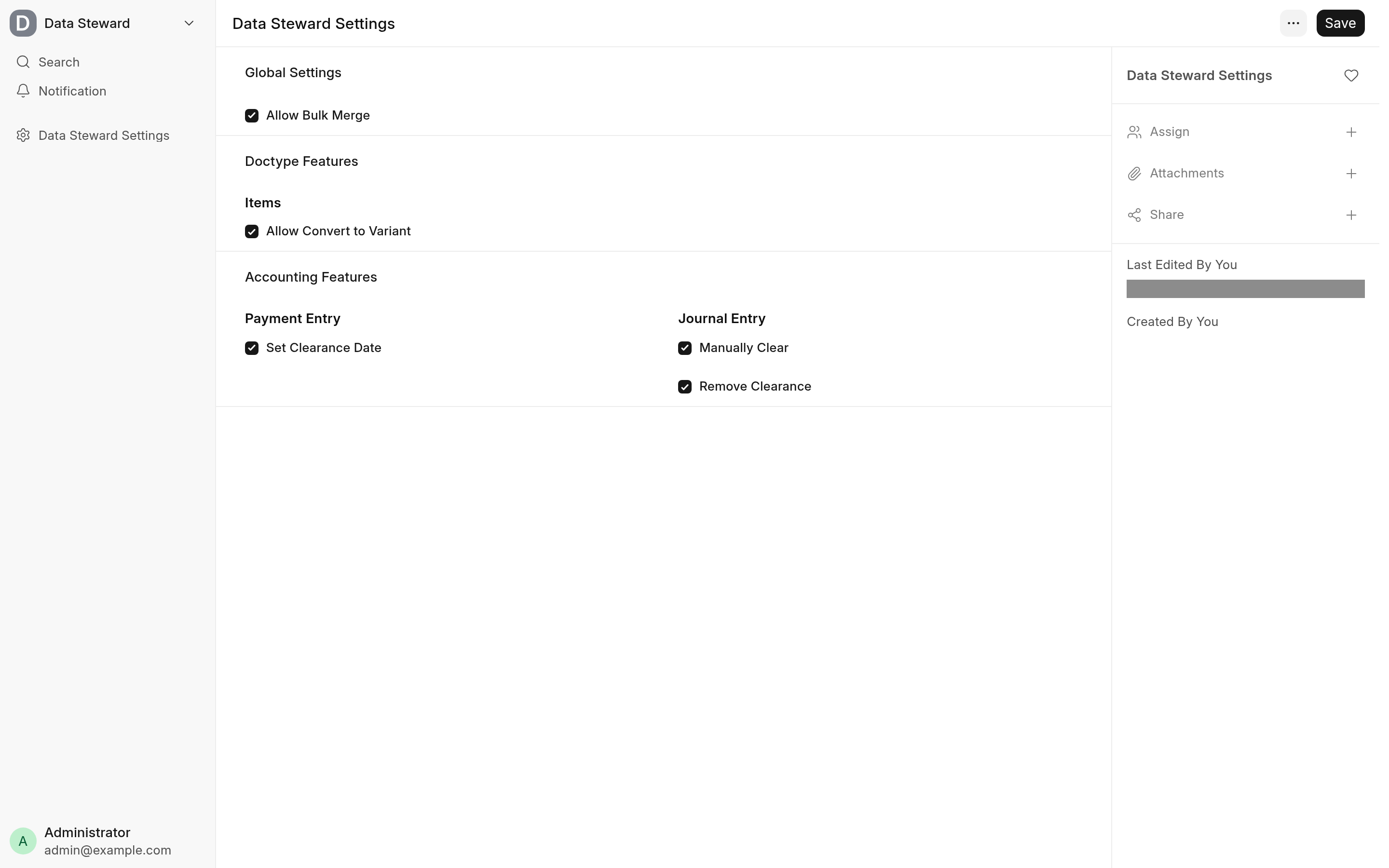
| Setting | Section | What it enables | Default |
|---|---|---|---|
| Allow Bulk Merge | Global Settings | Merge Selected in the list view of every DocType that allows renaming | Off |
| Allow Convert to Variant | Doctype Features, Items | Actions → Convert to Variant on the Item form | Off |
| Allow File Merge | Doctype Features, Files | Merge Files in the File list, and Actions → Merge into... on a File | Off |
| Set Clearance Date | Accounting Features, Payment Entry | Set Clearance Date on a submitted Payment Entry | Off |
| Manually Clear | Accounting Features, Journal Entry | Actions → Manually Clear on a submitted Journal Entry | Off |
| Remove Clearance | Accounting Features, Journal Entry | Actions → Remove Clearance on a submitted Journal Entry | Off |
When a tool is off, its button is not shown and its endpoint refuses every call with a permission error, so turning a setting off takes effect at once, also for a form that is already open. The settings track changes, so the document's version history shows who switched which tool on or off.
Roles and permissions
An enabled tool still checks who is calling it. Each endpoint checks, in this order, that the tool is enabled, that the user has one of its roles, and that the user may write the document.
| Tool | Roles (any one) | Document permission |
|---|---|---|
| Bulk merge | System Manager | Write on each record being merged and on the record kept, and delete on each record being merged (Frappe's rename checks these) |
| Convert to Variant | Item Manager, System Manager | Write on the Item |
| File merge | System Manager | Write on the File kept, and delete on each File merged |
| Set Clearance Date | Accounts Manager, System Manager | Write on the Payment Entry |
| Manually Clear, Remove Clearance | Accounts Manager, System Manager | Write on the Journal Entry |
The Administrator user passes every role check. The buttons are shown to anyone who can open the form or list while the tool is enabled; a user without the role gets an error when they use it. See Limitations and troubleshooting.
Editable side panel
The side panel Frappe opens from a Link cell in a report becomes an editing surface. There is no setting for it: who may change what is decided by the user's permissions on the document, exactly as in its form. See Edit in the side panel.
Full-width desk
The desk bundle sets Frappe's full-width layout on in a browser that has no layout stored yet, then leaves it alone. The choice is kept in the browser's local storage, the same place Frappe's own layout setting keeps it (Settings in the user menu, then Appearance, Layout: Compact or Full Width), so it applies per browser rather than per user. A user who switches back to Compact keeps that choice. There is no setting to turn this default off.
What the app adds to your site
This is the complete list.
DocTypes and fields
| What | Details |
|---|---|
| Data Steward Settings | A Single DocType in the Data Steward module, with the six check boxes above. System Manager has full access to it; no other role has any. |
The app adds no custom fields, property setters, roles, workspaces, reports, print formats, scheduled jobs or doc_events, and overrides no server-side DocType class. It replaces one of Frappe's whitelisted methods; see Whitelisted endpoints.
Desk scripts
| Where | Change |
|---|---|
| Every desk page | data_steward.bundle.js (app_include_js): the capability helper the forms ask before they show a button, the list view override, the file merge dialogs, the full-width default, and the patch that makes the side panel editable. |
| List views | The desk's ListView class is extended to add Merge Selected to the Actions menu of DocTypes with Allow Rename set, when Allow Bulk Merge is on. |
| Item | A form script (doctype_js) adds Convert to Variant under Actions on a saved Item. |
| File | A form script adds Merge into... under Actions on a saved file, and a list script (doctype_list_js) adds Merge Files to the Actions menu of the File list, the File Manager included. |
| Payment Entry | A form script adds Set Clearance Date on a submitted Payment Entry. |
| Journal Entry | A form script adds Manually Clear and Remove Clearance under Actions on a submitted Journal Entry. |
Whitelisted endpoints
All need a signed-in user. The ones that change data accept POST only and do not commit on their own: Frappe commits the request when it succeeds and rolls it back on an error.
| Method | What it does |
|---|---|
data_steward.api.check_capability | Returns whether a tool is enabled. The desk calls it before showing a button. |
data_steward.api.assert_capability | Raises a permission error when a tool is off |
data_steward.data_steward.hooks.bulk_merge | Merges records with Frappe's bulk_rename (POST) |
data_steward.data_steward.hooks.file.merge_files | Merges Files into one kept File, rewriting the references to them (POST) |
data_steward.data_steward.hooks.item.convert_to_variant | Makes an Item a variant of a template (POST) |
data_steward.data_steward.hooks.payment_entry.set_clearance_date | Sets a Payment Entry's clearance date (POST) |
data_steward.data_steward.hooks.journal_entry.manually_clear_journal_entry | Sets a Journal Entry's clearance date from its Bank Transaction (POST) |
data_steward.data_steward.hooks.journal_entry.remove_clearance_date_journal_entry | Clears a Journal Entry's clearance date (POST) |
data_steward.side_panel.get_preview | Frappe's side panel preview, plus the permission levels the user may change (GET). Replaces frappe.desk.doc_preview.get_preview through override_whitelisted_methods. |
data_steward.side_panel.save | Saves the fields changed in the side panel through a normal save, refusing a stale copy (POST) |
The settings module, data_steward.data_steward.doctype.data_steward_settings.data_steward_settings, whitelists its own check_capability and assert_capability too; the ones in data_steward.api call them.
Related
How it works for the code behind each tool