
Configuration
Every field of Mercury Settings, the Mercury token each feature needs, the roles the app checks, and everything the app adds to a site.
On this page
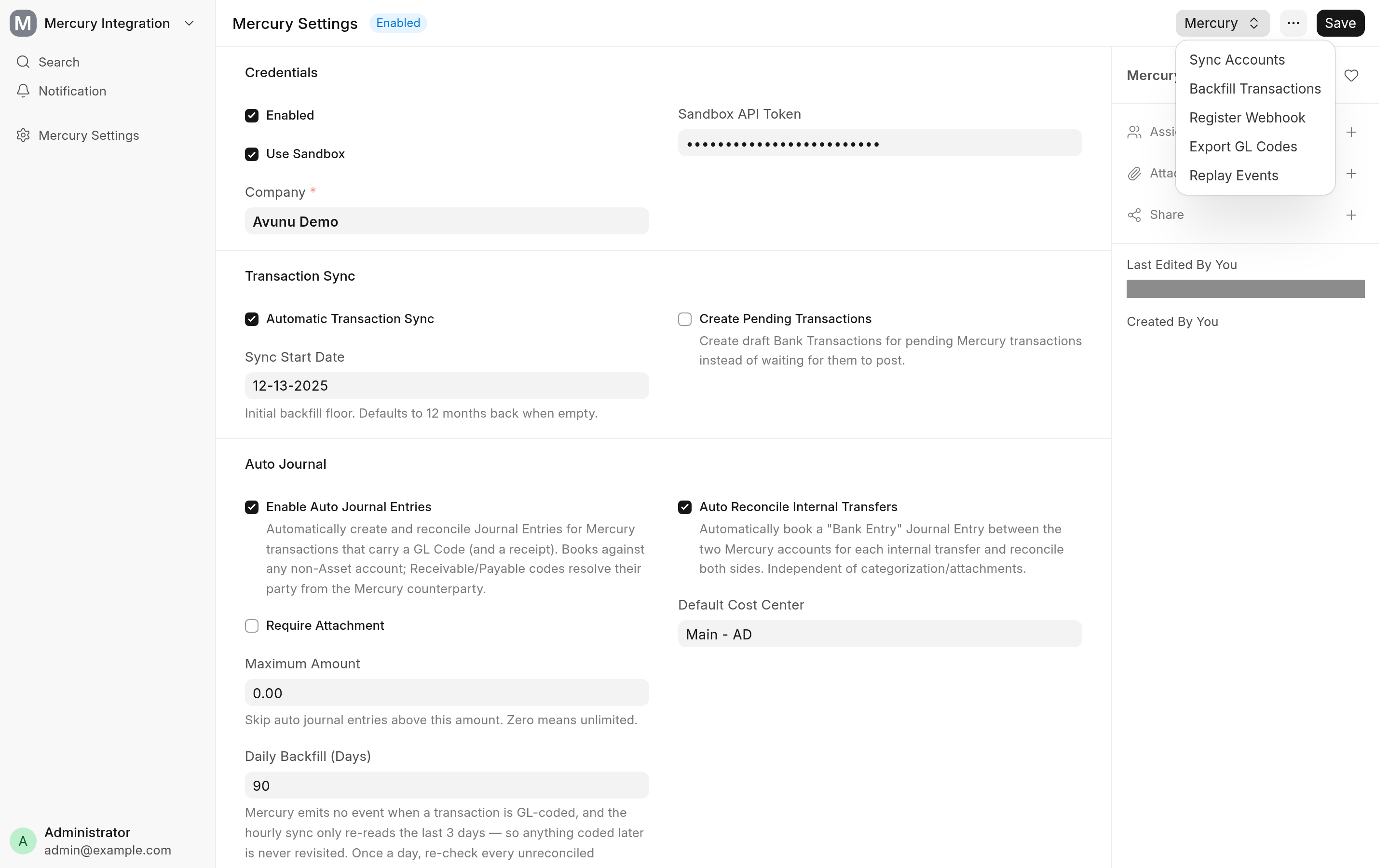
Everything the app does is set in Mercury Settings (search for it in the awesome bar). This page describes each field in the order the form shows it, then the roles the app checks and everything it adds to your site.
Set up in order
Set the Company and an API Token (or tick Use Sandbox and set a Sandbox API Token), tick Enabled and save. Saving checks the token against Mercury.
Choose Mercury → Sync Accounts to create or adopt the Bank Accounts. See Bank sync.
On production, choose Mercury → Register Webhook. Mercury's sandbox has no webhooks, so skip this there.
Choose Mercury → Backfill Transactions for the history you want, and tick Automatic Transaction Sync for the hourly import.
Turn on the parts you want: automatic journal entries, the invoicing gateway and payouts. Each page lists what it needs first.
Put the people who should hear about failures in Alert Recipients.
The Mercury menu appears once Enabled is saved.
Mercury Settings
Credentials
| Field | What it does | Default |
|---|---|---|
| Enabled | Turns the whole integration on. With it unticked, every scheduled job returns at once and the Mercury menu is hidden. | Off |
| Use Sandbox | Talks to Mercury's sandbox instead of production, with the Sandbox API Token. | Off |
| Company | The ERPNext company whose accounts the app books to. Required when Enabled is ticked. | |
| API Token | The production token, shown when Use Sandbox is unticked. Stored encrypted. | |
| Sandbox API Token | The sandbox token, shown when Use Sandbox is ticked. Stored encrypted. |
Saving with Enabled ticked lists your Mercury accounts once to check the token. A token Mercury refuses stops the save with "Mercury API token validation failed", followed by Mercury's answer.
Transaction Sync
| Field | What it does | Default |
|---|---|---|
| Automatic Transaction Sync | Imports the transactions of every Mercury Bank Account each hour. | Off |
| Sync Start Date | How far back the first sync of a Bank Account reaches. Later syncs start 3 days before the account's last imported date. | 12 months back |
| Create Pending Transactions | Creates a draft Bank Transaction for a pending Mercury transaction, and submits it once Mercury posts it. Unticked, pending transactions wait until they post. | Off |
Events & Webhook
These fields are read-only. Register Webhook fills them in.
| Field | What it shows |
|---|---|
| Webhook Endpoint ID | The id of the endpoint registered in Mercury. |
| Webhook Signing Secret | The secret Mercury signs deliveries with. Mercury returns it only when the endpoint is created, so it is stored then. |
| Webhook Status | The endpoint's status in Mercury, refreshed by the daily health check. |
| Events Last Polled At | When the 15-minute poll last ran. |
GL Codes
This section has no fields. It explains that Mercury GL codes map to ERPNext accounts by exact Account Name, and that Mercury → Export GL Codes produces the file to upload. See Export your accounts as GL codes.
Auto Journal
| Field | What it does | Default |
|---|---|---|
| Enable Auto Journal Entries | Books a Journal Entry for each GL-coded transaction and reconciles it. | Off |
| Require Attachment | Books only transactions that have a receipt attached in Mercury. | On |
| Maximum Amount | Leaves transactions above this amount for you to book by hand. Zero means no limit. | 0 |
| Daily Backfill (Days) | How many days back the daily sweep re-checks unreconciled transactions for a GL code added after the sync. Zero turns the sweep off. | 90 |
| Auto Reconcile Internal Transfers | Books a Bank Entry for each transfer between two Mercury accounts and reconciles both sides. It works whether or not Enable Auto Journal Entries is ticked. | On |
| Default Cost Center | The cost center for income and expense lines. Only non-group cost centers of the company can be picked. Empty, the company's default cost center is used when it is not a group. |
Require Attachment, Maximum Amount, Daily Backfill (Days) and Default Cost Center are shown only when Enable Auto Journal Entries is ticked.
Accounts Receivable Gateway
Shown fields depend on Enable AR Gateway.
| Field | What it does | Default |
|---|---|---|
| Enable AR Gateway | Registers Mercury as a payment gateway when you save, and turns on invoice creation, polling and funding. | Off |
| Destination Bank Account | The Mercury Bank Account that receives invoice payments. It must have been through Sync Accounts. Required when the gateway is on. | |
| AR Clearing Account | The account paid invoices are booked to until the money reaches the bank. It becomes the payment account of the Mercury Payment Gateway Account. Required when the gateway is on. | |
| Invoice Email Sender | ERP sends ERPNext's Payment Request email with the pay link; Mercury asks Mercury to email its own invoice. See Who emails the customer. | ERP |
| Accept ACH Debit | Offers bank payment on the Mercury pay page. | On |
| Accept Credit Card | Offers card payment on the Mercury pay page. | Off |
| Show Real Account Number | Sent to Mercury as useRealAccountNumber when the invoice is created, so the invoice shows the account's real number. | Off |
| Card Fees Account | The expense account for the card fees Mercury takes off a card payment. Shown when Accept Credit Card is ticked. |
Overdue Reminders
Shown when Enable AR Gateway is ticked. Reminder Interval (Days) and Maximum Reminders are shown only when Send Overdue Reminders is ticked.
| Field | What it does | Default |
|---|---|---|
| Send Overdue Reminders | Re-sends the Payment Request email for overdue unpaid invoices daily. | On |
| Reminder Interval (Days) | The least number of days between two reminders. Zero means 7. | 7 |
| Maximum Reminders | How many reminders a Payment Request gets in all. Zero means 3. | 3 |
Payouts
| Field | What it does | Default |
|---|---|---|
| Enable Payouts | Turns on Pay via Mercury, the approval poll, the daily invite check and payout reconciliation. | Off |
| Payout Mode | Request Approval queues each payment in Mercury for a second user to approve. Direct Send sends it at once. | Request Approval |
| Auto Reconcile Payouts | Reconciles each payout's Bank Transaction with its Payment Entry or payroll Journal Entry. | On |
| Payroll Funding Bank Account | The Mercury Bank Account payroll is paid from. | |
| Vendor Funding Bank Account | The Mercury Bank Account supplier payments are paid from. |
The other fields are shown only when Enable Payouts is ticked. The payee buttons on Employee and Supplier work without it: they need only Enabled.
Notifications
| Field | What it does |
|---|---|
| Alert Recipients | Email addresses, separated by commas or line breaks, that receive an alert when a sync, booking, invoice or payout fails. Empty, no alert is sent. |
Alerts go out through the site's outgoing email with a subject that starts with [Mercury]. Failures are also written to the Error Log.
Mercury API tokens
A read-only token is enough for bank sync, automatic journal entries and invoice polling.
Creating invoices needs a read-write or custom-scoped token.
Direct Send needs a read-write token and the server's fixed outgoing IP address on Mercury's allow list. Request Approval needs neither, but a second Mercury user approves each payment in Mercury.
Token scopes are Mercury's own and can change; check them in Mercury's API token settings.
Roles the app checks
| Action | Who may do it |
|---|---|
| Open and change Mercury Settings, Backfill Transactions | System Manager, Accounts Manager |
| Sync Accounts, Export GL Codes | System Manager, Accounts Manager |
| Register Webhook, Replay Events | System Manager |
| Recreate Mercury Invoice on a Payment Request | System Manager, Accounts Manager |
| Pay via Mercury on a Payroll Entry | System Manager, HR Manager, Payroll Manager, Accounts Manager |
| Pay via Mercury on a Payment Entry | System Manager, Accounts Manager |
The Mercury buttons on Employee and Supplier, link_existing_recipients | System Manager, HR Manager, Accounts Manager |
Re-run a failed event (retry_event) | System Manager, Accounts Manager |
Anyone else who presses one of these buttons gets a permission error. The scheduled jobs and the webhook do their bookings as Administrator.
What the app adds to your site
DocTypes
| DocType | Kind | Purpose |
|---|---|---|
| Mercury Settings | Single | The settings above. It is also the payment gateway controller ERPNext calls for the Mercury gateway. |
Custom fields
All are read-only and are not copied when you duplicate a document.
| DocType | Fields | Holds |
|---|---|---|
| Bank Account | Mercury Account ID | The Mercury account the Bank Account stands for. ERPNext's integration_id is left to Plaid. |
| Customer | Mercury Customer ID | The Mercury invoicing customer. |
| Employee | A Mercury Direct Deposit section with Mercury Recipient ID, Mercury Recipient Status and a hidden Mercury Invite ID | The Mercury payee and its state: Invite Sent, Active or Disabled. |
| Supplier | A Mercury Payments section with the same three fields | As for Employee. |
| Payment Request | Mercury Invoice ID, Mercury Reminders Sent, Mercury Last Reminder On | The Mercury invoice and its reminders. The pay link is in ERPNext's Payment URL. |
| Payment Entry, Salary Slip | Mercury Transaction ID, Mercury Payment Status and a hidden Mercury Approval Request ID | The state of a payout. See Payout statuses. |
Bank Transactions need no field of their own: the Mercury transaction id goes in ERPNext's Transaction ID.
Document events and form scripts
| DocType | What the app adds |
|---|---|
| Bank Transaction | On submit: books the funding Journal Entry for a paid invoice's deposit, and reconciles a payout's withdrawal. |
| Payment Request | On cancel: cancels the unpaid Mercury invoice, or stops the cancel while its payment is processing or paid. Form: Mercury → Recreate Mercury Invoice. |
| Salary Slip | On cancel: stops the cancel while a Mercury payout is in flight. |
| Payroll Entry | Form: Mercury → Pay via Mercury. |
| Payment Entry | Form: Mercury → Pay via Mercury. |
| Employee, Supplier | Form: Mercury → Send Mercury Invite, Match Mercury Contact, Refresh from Mercury, Enter Bank Details Directly. |
The app does not override or extend any standard DocType class.
Scheduled jobs
Every job returns at once unless Enabled is ticked, and each checks its own switch too.
| When | Job | Also needs |
|---|---|---|
| Every 15 minutes | Poll Mercury's events API | |
| Every 15 minutes | Poll open Mercury invoices and move their Payment Requests on | Enable AR Gateway |
| Every 15 minutes | Poll payments waiting for approval in Mercury | Enable Payouts |
| Hourly | Retry invoice creation for Payment Requests that have no Mercury invoice | Enable AR Gateway |
| Hourly (long) | Sync the transactions of every Mercury Bank Account | Automatic Transaction Sync |
| Daily | Re-check unreconciled transactions for a late GL code | Enable Auto Journal Entries, Daily Backfill (Days) above zero |
| Daily | Check the webhook and reactivate it if Mercury turned it off | A registered webhook |
| Daily | Send overdue invoice reminders | Enable AR Gateway, Send Overdue Reminders |
| Daily | Pick up completed payee invites | Enable Payouts |
| Daily | Reconcile payouts whose Bank Transaction landed before their voucher existed | Enable Payouts, Auto Reconcile Payouts |
Records created on use
| Record | Created by |
|---|---|
Bank Mercury, Bank Accounts, GL accounts | Sync Accounts |
Payment Gateway Mercury and its Payment Gateway Account | Saving Mercury Settings with Enable AR Gateway ticked |
| Bank Transactions | The transaction sync, the webhook and the poll |
| Journal Entries, Payment Entries | Automatic journal entries, internal transfers, invoice settlement and funding |
Integration Requests (service Mercury) | Every inbound event and every payout attempt |
| Files | Receipts copied from Mercury, attached as private files |
Whitelisted endpoints
| Endpoint | Used by |
|---|---|
mercury_banking_integration.webhooks.webhook | Mercury. Guest, POST only, and refused without a valid Mercury-Signature. |
sync.accounts.sync_mercury_accounts | Sync Accounts |
sync.events.register_webhook_endpoint, sync.events.retry_event | Register Webhook; re-running a failed event |
sync.gl_codes.preview_gl_codes, sync.gl_codes.export_gl_codes | Export GL Codes |
ar.invoices.recreate_mercury_invoice | Recreate Mercury Invoice |
payouts.payroll.get_payroll_payout_preview, payouts.payroll.initiate_payroll_payouts | Pay via Mercury on a Payroll Entry |
payouts.vendor.pay_payment_entry_via_mercury | Pay via Mercury on a Payment Entry |
payouts.recipients.send_invite, refresh_recipient, create_recipient_directly, list_unmatched_recipients, match_recipient, link_existing_recipients | The Employee and Supplier buttons, and bulk matching |
The paths in the first column after the first row are relative to mercury_banking_integration.. Mercury Settings also has four whitelisted document methods behind its menu: sync_accounts_now, backfill_transactions, register_webhook and replay_events.
Related
How it works for the code behind each table above