
Address geocoding and maps
How an Address is looked up on Nominatim when you save it, what it fills in, and how the Customer and Supplier maps follow the primary address.
On this page
Every Address gets a location. When you save one, CIS Plus looks the address up on Nominatim, OpenStreetMap's free geocoding service, and stores its latitude and longitude. The point is drawn on the Address's map, and on the map of every Customer and Supplier whose primary address it is.
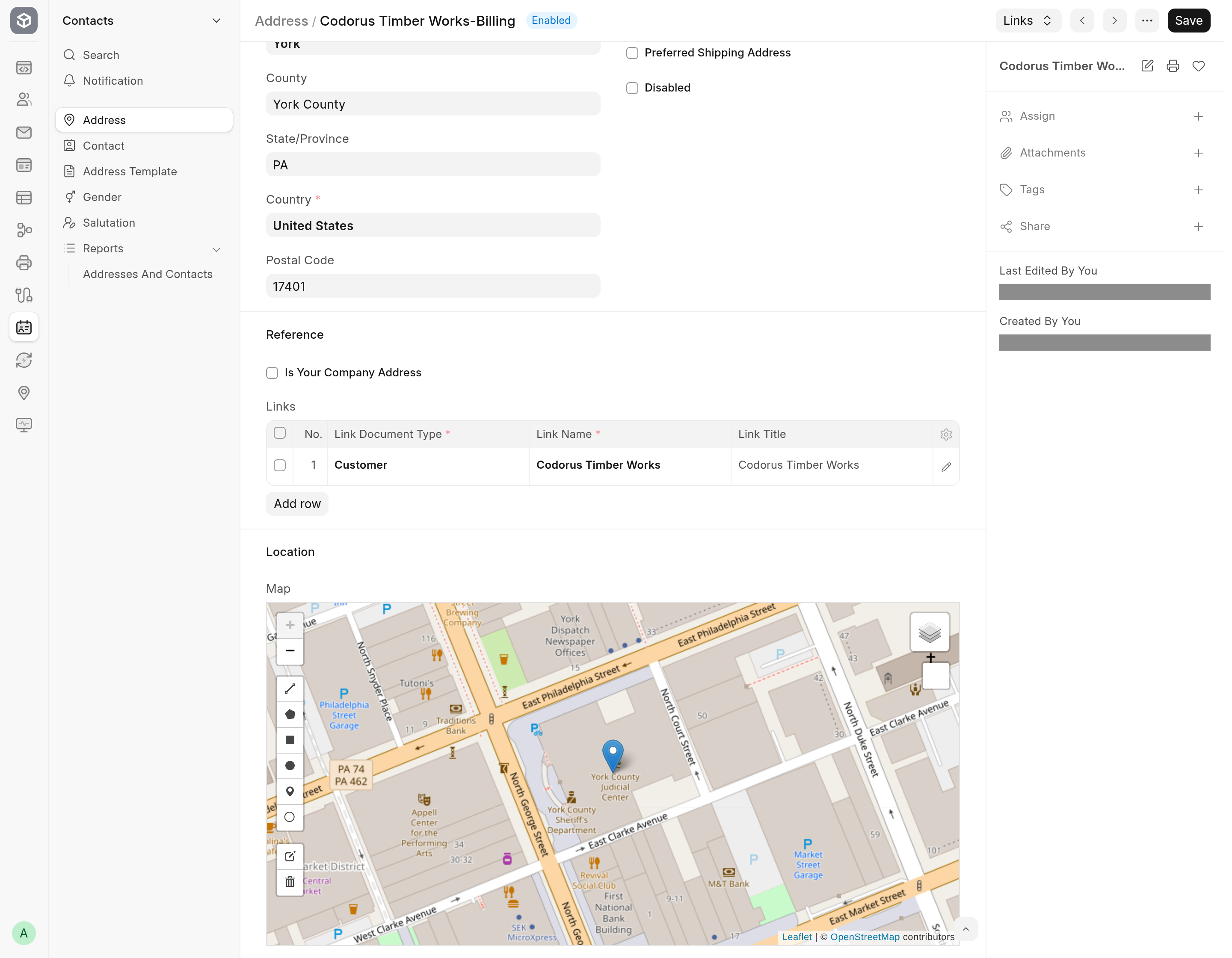
Geocode an address
Open or create an Address, from Address in the desk, from the side panel of a Customer or Supplier (see Edit addresses and contacts in the side panel), or any other way ERPNext offers.
Fill in the address: Address Line 1, City/Town, State/Province, Postal Code and Country, as much as you have.
Save.
The app sends Address Line 1, City/Town, State/Province, Postal Code and Country, joined with commas, to Nominatim and takes its first result. Then:
Latitude and Longitude (hidden fields) are set, and the Map in the Location section at the bottom of the form shows the point.
Fields you left blank are filled in from the result: Postal Code, Country, State/Province, County and City/Town (from the result's city, town or village). A field that already has a value is never changed.
When the Address's country is United States, a state name from the result is written as its two-letter code, so
PennsylvaniabecomesPA.
Address Line 2 and County are not sent. An Address where all five sent fields are blank is not looked up.
When an address is looked up again
The coordinates stored on the Address are its cache. A saved Address that has coordinates is looked up again only when one of the five fields above changes. One without coordinates, because an earlier lookup failed or found nothing, is looked up on every save until one succeeds.
When a lookup fails or finds nothing:
The Address is saved anyway.
If it was a failure (the service could not be reached, timed out, returned an error or was busy), an alert says so. A lookup that finds no match shows no message. See Troubleshooting.
If you changed the address, its old coordinates and point are cleared, because they belong to the address as it was. A point you drew in the same edit is cleared with them. Coordinates set in the same edit, through an import or the API, are kept.
Draw a point by hand
The Map on the Address is an ordinary Frappe map field, so you can draw a point on it. A point you draw is kept only while the Address has no coordinates, which is the case when its lookups failed or found nothing. On an Address that has coordinates, saving redraws the point from them, and a drawn point is lost; once a lookup succeeds, the same happens.
The map on a Customer or Supplier
The Address & Contact tab of a Customer and of a Supplier has a Location section with a read-only Map. It shows the point of the party's primary address (Customer Primary Address on a Customer, Primary Address on a Supplier).
The point follows the address:
Choosing another primary address with Set as Primary in an address card's menu saves the party, which takes that address's point. Saving the party also takes the point after the primary address is changed any other way.
A party's first address, added in the side panel, becomes its primary address, and the party's map shows it straight away.
Saving the primary Address with a new point, from anywhere, copies the point to every Customer and Supplier whose primary address it is. Their Last Updated On does not change.
A party whose primary address has no point shows an empty map.
How a lookup works
The app follows Nominatim's usage policy:
Each request identifies the app in its User-Agent, with its version and repository address.
The whole bench sends at most one request per second. Every site on the bench shares that slot through Redis. A save waits up to five seconds for the slot, and when none comes free it skips the lookup and says so.
A request gives up after 5 seconds to connect and 10 seconds to read, so a slow service never holds a save open for long.
An Address that has coordinates is not looked up again until its address changes.
That makes it a fit for modest volumes: people saving addresses one at a time. An import of many addresses goes at most one lookup per second, and when several saves compete for the slot, some skip their lookup; saving each of those Addresses again later fills them in.
Geocoding sends the address text (street, city, state, postal code and country) to the public Nominatim service, which the OpenStreetMap Foundation runs. Make sure that is acceptable for your data before you install the app.
The list map views
Because the app gives Address, Customer and Supplier a latitude, a longitude and a location map field, Frappe offers Map among the views of their lists, which would put a pin on every record with a location. On Frappe v16 that view fails to open: see Limitations. The maps on the Address, Customer and Supplier forms are not affected.