
Receive mail from the relay
Turn on incoming mail for an Email Account on a Cloudflare domain, connect it to the Cloudflare email relay, and rotate the webhook secret.
On this page
An Email Account on a Cloudflare domain has no mailbox for Frappe to poll. Instead, Cloudflare Email Routing hands each message to the Cloudflare email relay, a Worker that stores it and posts it to the account's webhook on the site. The app checks the request and passes the message to Frappe's own inbound processing, the code that handles mail pulled from an IMAP mailbox.
Before you start
The Email Domain and Email Account set up for sending, as Send mail through Cloudflare describes.
The site reachable from the internet over HTTPS, and
host_namein its site config set to that address with its scheme, for examplehttps://erp.example.com. The webhook URL is built from it.A deployment of the relay, and someone who can add a tenant to it.
Email Routing enabled on the domain's Cloudflare zone.
Turn on incoming mail
On the Email Account, tick Enable Incoming.
On the Incoming tab, choose Append To, the doctype each new message creates, such as ToDo, Issue or Lead. Set the other options you want: Attachment Limit (MB), Create Contacts from Incoming Emails, Notify if unreplied, and Enable Auto Reply with its message.
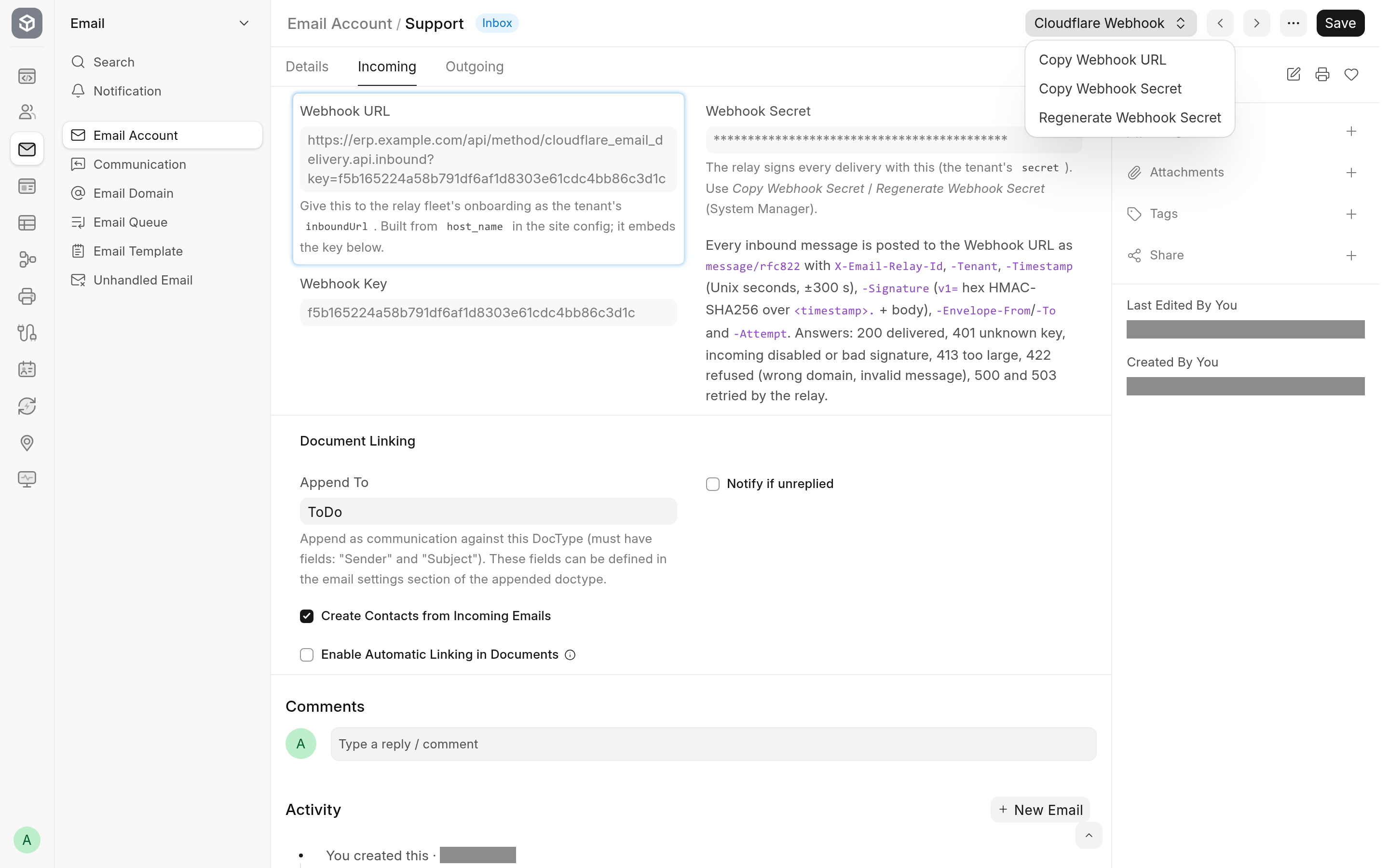
Save. The Cloudflare Email Receiving section appears on the Incoming tab with the Webhook URL.
Click Cloudflare Webhook > Copy Webhook URL. As a System Manager, also click Cloudflare Webhook > Copy Webhook Secret.
Give both to whoever runs the relay. They become the site's tenant entry: the URL is the tenant's
inboundUrl, the secret itssecret. Name the domains whose mail should reach this site in the same entry.In the zone's Email Routing in Cloudflare, route the addresses, or the catch-all, to the relay Worker.
If saving fails with "The webhook URL (…) must be https", host_name is missing or is not an https address: see Limitations and troubleshooting.
To test, send a message to the address from an outside mailbox. It shows up as a Communication on a new document of the Append To doctype, or on the document it replies to.
What happens to each message
When a delivery arrives, the app:
refuses it if it is larger than the site's request limit (see
max_file_sizein Configuration);finds the Email Account by the key in the URL, and refuses the request unless that account has Enable Incoming ticked and is on a Cloudflare domain;
checks the signature against the account's Webhook Secret, and refuses a request signed more than 5 minutes before or after the site's clock;
checks that the address the message was routed to belongs to the account's domain or to its own address's domain;
skips a message the site already has, recognised by the relay's delivery id or by its
Message-ID;creates the Communication, links it to an existing document when the message is a reply and otherwise creates a new Append To document, then sends the auto-reply and notifications the account is set up for.
Steps 5 and 6 run as cloudflare-email-relay@relay.invalid, a disabled user with one narrow permission, not as Administrator. A message sent from the account's own address that is not a reply is ignored, as Frappe ignores it in a mailbox.
The relay learns from the answer whether to keep the message as delivered, park it as rejected, or retry it later. The webhook contract lists every answer. When processing fails for any other reason, the app logs it in Error Log under "Cloudflare relay inbound", stores the raw message as an Unhandled Email, and the relay retries.
Rotate the webhook secret
Rotate the secret when it may have been exposed, or when you hand the tenant to someone new.
As a System Manager, open the Email Account and click Cloudflare Webhook > Regenerate Webhook Secret.
Confirm. Requests signed with the old secret are rejected from now on.
Click Cloudflare Webhook > Copy Webhook Secret and have the tenant's
secretin the relay updated.
The key, and so the Webhook URL, stays the same. Deliveries that arrive between the two steps are answered 401: the relay parks them as rejected, and they can be retried from the relay once its secret is updated.
Changing the site's address
The Webhook URL is rebuilt from host_name each time the Email Account is saved. After changing host_name, save the account (or its Email Domain, which re-saves every account on it) and give the new URL to the relay. The key does not change.