
Anchor billing periods
Align a customer's subscriptions to calendar months or years or to an anniversary date, with the first period prorated by the day.
On this page
By default ERPNext bills each subscription from its own start date, so a customer with ten subscriptions has ten billing dates. A billing anchor puts all of a customer's subscriptions on the same dates. A subscription that starts between two anchor dates is billed first for the days up to the next anchor date, at a prorated rate, and then for full periods.
Anchor a customer
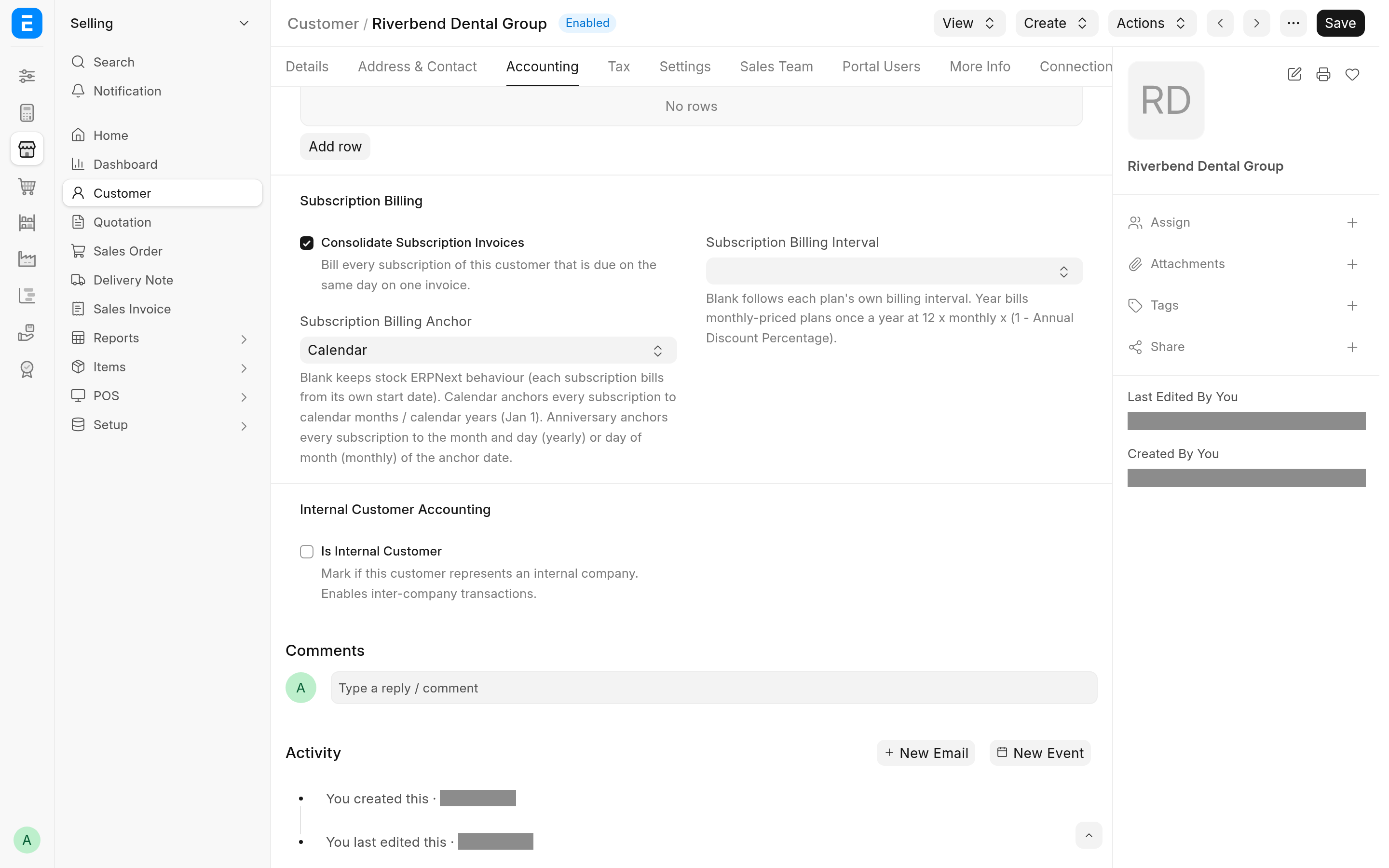
Open the Customer and go to the Subscription Billing section on the Accounting tab.
Set Subscription Billing Anchor:
Calendar: periods follow calendar months, or calendar years starting on 1 January.
Anniversary: periods follow a date of your choice. Set Subscription Billing Anchor Date; the save is refused without it.
Optionally set Subscription Billing Interval to Year to bill the customer's monthly plans once a year (see Bill monthly plans yearly). Leave it blank, or set Month, to bill each plan on its own interval.
Save.
To go back to stock billing, clear Subscription Billing Anchor. The anchor date and the interval are cleared with it on save.
How periods are cut
Each period ends the day before the next anchor date.
| Anchor | Monthly plan | Yearly plan |
|---|---|---|
| Calendar | 1st of the month to the last day of the month | 1 January to 31 December |
| Anniversary | The anchor date's day of the month to the day before it, a month later | The anchor date's day and month to the day before it, a year later |
A plan with a Billing Interval Count above 1 takes that many months or years per period. Under a Calendar anchor, a 3-month plan bills calendar quarters (January, April, July and October).
On an Anniversary anchor, a day that a month does not have falls on the month's last day: an anchor on the 31st gives 30 April and 28 February, and an anchor on 29 February gives 28 February in other years.
A trial period and a Subscription End Date still apply: while the subscription is in its trial, the period ends on the trial end date, and no period runs past the end date.
Proration
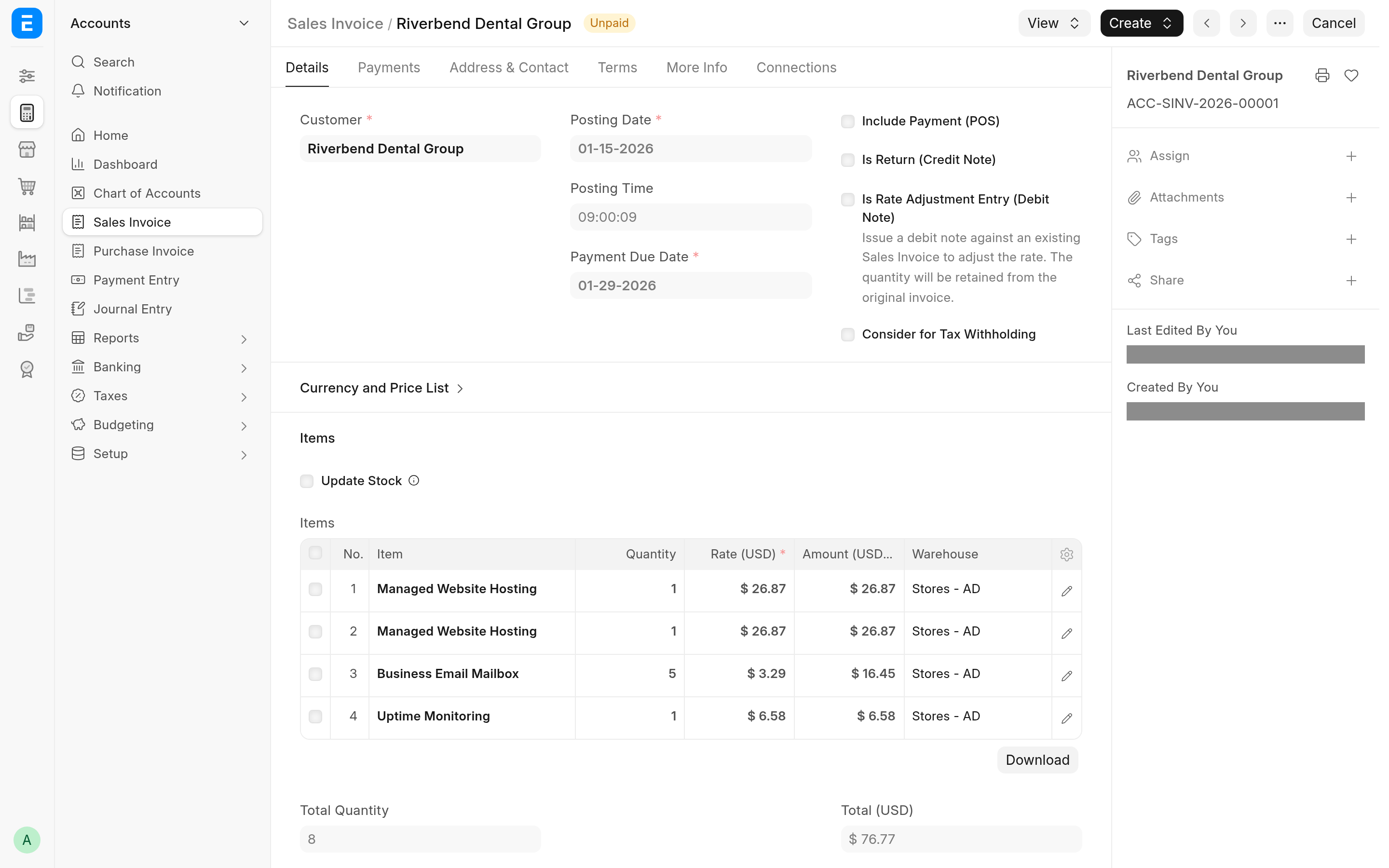
A period shorter than a full term, such as the first period of a subscription that starts between anchor dates, is billed at the plan rate times billed days divided by the days in the term the period falls in. Both are calendar days, counting the first and last day. A full term is billed at exactly the plan rate, never a rounded fraction of it.
For example, under a Calendar anchor, a monthly plan of 49.00 that starts on 15 January is billed for 15 to 31 January at 49.00 x 17 / 31 = 26.87, and from 1 February for full months.
With Prorate off in Subscription Settings, a short period is billed at the full plan rate.
The invoices the engine makes for an anchored customer ignore Pricing Rules. A Pricing Rule would otherwise overwrite the prorated rate each time the invoice is saved. If an anchored customer has customer-specific prices in Pricing Rules, move that pricing onto the plan (or onto a plan of its own) before you anchor the customer.
Bill monthly plans yearly
With Subscription Billing Interval set to Year, a monthly plan is billed once a year, on the yearly anchor, at:
yearly rate = monthly rate x 12 x (1 - Annual Discount Percentage / 100)Annual Discount Percentage is in Subscription Settings and is 16.67 (two months free) by default. A plan of 2, 3, 4 or 6 months is billed 6, 4, 3 or 2 times its rate a year, less the same discount. Yearly plans are billed as they are, without a discount.
Changing the anchor of an existing customer
The anchor applies to the customer's existing subscriptions too. At the next billing run, a subscription whose stored period does not match the anchor keeps its current start date and gets the anchored end date, so its next invoice is a prorated short period up to the anchor date. From then on it bills full anchored periods.
When a new subscription is billed
Mid-term Billing Mode in Subscription Settings decides when the first, prorated invoice of a new subscription of an anchored customer is made:
Immediate (the default): when the subscription is saved, if its first invoice is already due, as stock ERPNext does. A subscription that starts in the future, or whose first invoice falls due later (one billed at the end of the period, for example), is billed by the daily run.
Next Daily Run: by ERPNext's daily Process Subscription job.
Backdated start dates
ERPNext's daily run bills at most one period past the current period, and then starts the period again from the run date, so a subscription created with a start date far in the past would lose periods. The app refuses such a subscription when you save it, for an anchored customer:
If the start date lies in a billing period that has already ended, the save is refused unless Generate New Invoices Past Due Date is ticked on the Subscription. With it ticked and Mid-term Billing Mode on Immediate, saving the subscription bills every elapsed period.
With Mid-term Billing Mode on Next Daily Run, the save is also refused when today is one full billing period or more past the end of the first period. Ticking Generate New Invoices Past Due Date does not lift this check.
To load subscriptions with a history, see Load subscriptions with a history.
What cannot be anchored
The app refuses these rather than billing them wrongly:
Plans with a Billing Interval of Day or Week.
Plans priced by Monthly Rate in Subscription Price Based On.
With Subscription Billing Interval set to Year, monthly plans whose Billing Interval Count does not divide 12 (5, 7, 8 and so on).
Follow Calendar Months on the Subscription.
Supplier subscriptions: only customers are anchored.
A new subscription that breaks one of these rules cannot be saved. An existing subscription that breaks one, because its customer was anchored later, is not billed: the daily run writes the error to the Error Log each day until you fix the plan or the subscription. The messages are in Troubleshooting.